Showing posts with label spark. Show all posts

7/24/24

Building Real-Time Data Pipelines: A Practical Guide - Data Engineering Process Fundamentals

Overview

In modern data engineering solutions, handling streaming data is very important. Businesses often need real-time insights to promptly monitor and respond to operational changes and performance trends. A data streaming pipeline facilitates the integration of real-time data into data warehouses and visualization dashboards.

Data Engineering Process Fundamentals - Building Real-Time Data Pipelines: A Practical Guide

  • Follow this GitHub repo during the presentation: (Give it a star)

👉 https://github.com/ozkary/data-engineering-mta-turnstile

  • Read more information on my blog at:

👉 https://www.ozkary.com/2023/03/data-engineering-process-fundamentals.html

YouTube Video

Video Agenda

  1. What is Data Streaming?

    • Understanding the concept of continuous data flow.

    • Real-time vs. batch processing.

    • Benefits and use cases of data streaming.

  2. Data Streaming Channels

    • APIs (Application Programming Interfaces)

    • Events (system-generated signals)

    • Webhooks (HTTP callbacks triggered by events)

  3. Data Streaming Components

    • Message Broker (Apache Kafka)

    • Producers and consumers

    • Topics for data categorization

    • Stream Processing Engine (Apache Spark Structured Streaming)

  4. Solution Design and Architecture

    • Real-time data source integration

    • Leveraging Kafka for reliable message delivery

    • Spark Structured Streaming for real-time processing

    • Writing processed data to the data lake

  5. Q&A Session

    • Get your questions answered by the presenters.

Why Join This Session?

  • Stay Ahead of the Curve: Gain a comprehensive understanding of data streaming, a crucial aspect of modern data engineering.
  • Unlock Real-Time Insights: Learn how to leverage data streaming for immediate processing and analysis, enabling faster decision-making.
  • Learn Kafka and Spark: Explore the power of Apache Kafka as a message broker and Apache Spark Structured Streaming for real-time data processing.
  • Build a Robust Data Lake: Discover how to integrate real-time data into your data lake for a unified data repository.

Presentation

Introduction - What is Data Streaming?

Data streaming enables us to build data integration in real-time. Unlike traditional batch processing, where data is collected and processed periodically, streaming data arrives continuously, and it is processed on-the-fly.

  • Understanding the concept of continuous data flow
    • Real-time, uninterrupted transfer of data from various channels.
    • Allows for immediate processing and analysis of data as it is generated.
  • Real-time vs. batch processing
    • Data is collected and process in chunks at certain times
    • The data can take hours and even days depending on the source
  • Benefits and use cases of data streaming
    • React instantly to events
    • Predict trends with real-time updates
    • Update dashboard with up to the minute/seconds data

Data Engineering Process Fundamentals - What is data streaming

Data Streaming Channels

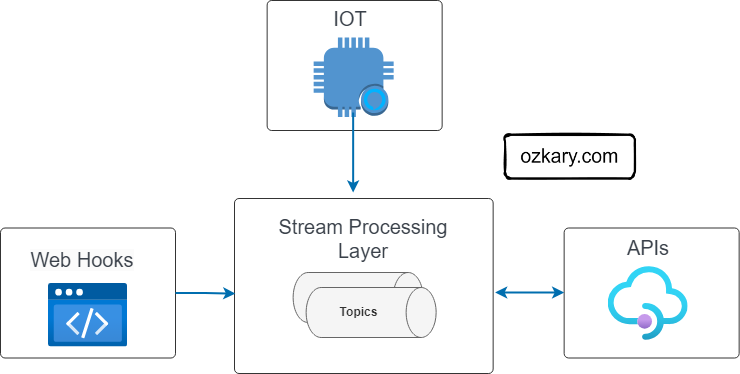
Data streams can arrive from various channels, often hosted on HTTP endpoints. The specific channel technology depends on the provider. Generally, the integration involves either a push or a pull connection.

  • Events (Push Model): These can be delivered using a subscription model like Pub/Sub, where your system subscribes to relevant topics and receives data "pushed" to it whenever events occur. Examples include user clicks, sensor readings, or train arrivals.

  • Webhooks (Push-Based on Events): These are HTTP callbacks triggered by specific events on external platforms. You set up endpoints that listen for these notifications to capture the data stream.

  • APIs (Pull Model): Application Programming Interfaces are used to actively fetch data from external services, like social media platforms. Scheduled calls are made to the API at specific intervals to retrieve the data.

Data Engineering Process Fundamentals - Data streaming channels

Data Streaming System

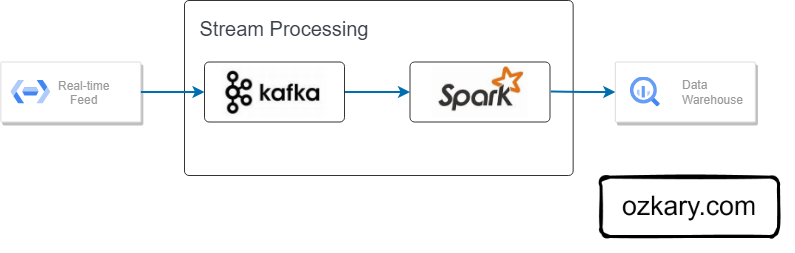
Powering real-time data pipelines, Apache Kafka efficiently ingests data streams, while Apache Spark analyzes and transforms it, enabling large-scale insights.

Apache Kafka:

Apache Kafka: The heart of the data stream. It's a high-performance platform that acts as a message broker, reliably ingesting data (events) from various sources like applications, sensors, and webhooks. These events are published to categorized channels (topics) within Kafka for further processing.

Spark Structured Streaming:

Built on Spark, it processes Kafka data streams in real-time. Unlike simple ingestion, it allows for transformations, filtering, and aggregations on the fly, enabling real-time analysis of streaming data.

Data Engineering Process Fundamentals - Data streaming Systems

Data Streaming Components

Apache Kafka acts as the central message broker, facilitating real-time data flow. Producers, like applications or sensors, publish data (events) to categorized channels (topics) within Kafka. Spark then subscribes as a consumer, continuously ingesting and processing these data streams in real-time.

  • Message Broker (Kafka): Routes real-time data streams.
  • Producers & Consumers: Producers send data to topics, Consumers receive and process it.
  • Topics (Categories): Organize data streams by category.
  • Stream Processing Engine (Spark Structured Streaming):
    • Reads data from Kafka.
    • Extracts information.
    • Transforms & summarizes data (aggregations).
    • Writes to a data lake.

Data Engineering Process Fundamentals - Data streaming Components

Use case Background

The Metropolitan Transportation Authority (MTA) subway system in New York has stations around the city. All the stations are equipped with turnstiles or gates which tracks as each person enters (departure) or exits (arrival) the station.

  • The MTA subway system has stations around the city.
  • All the stations are equipped with turnstiles or gates which tracks as each person enters or leaves the station.
  • CSV files provide information about the amount of commuters per stations at different time slots.

Data Engineering Process Fundamentals - Data streaming MTA Gates

Data Specifications

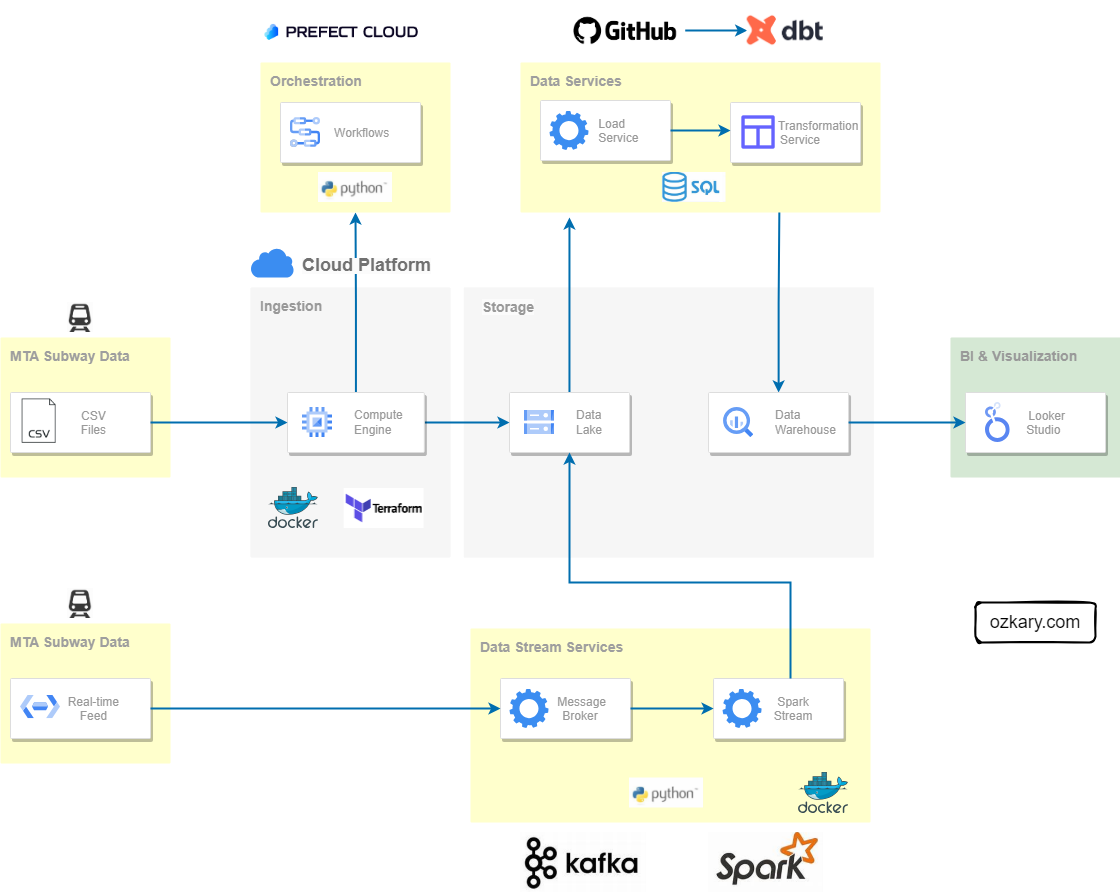
Since we already have a data transformation layer that incrementally updates the data warehouse, our real-time integration will focus on leveraging this existing pipeline. We'll achieve this by aggregating data from the stream and writing the results directly to the data lake.

  • Group by these categorical fields: "AC", "UNIT","SCP","STATION","LINENAME","DIVISION", "DATE", "DESC"
  • Aggregate these measures: "ENTRIES", "EXITS"
  • Sample result: "A001,R001,02-00-00,Test-Station,456NQR,BMT,09-23-23,REGULAR,16:54:00,140,153"

# Define the schema for the incoming data
turnstiles_schema = StructType([
    StructField("AC", StringType()),
    StructField("UNIT", StringType()),
    StructField("SCP", StringType()),
    StructField("STATION", StringType()),
    StructField("LINENAME", StringType()),
    StructField("DIVISION", StringType()),
    StructField("DATE", StringType()),
    StructField("TIME", StringType()),
    StructField("DESC", StringType()),
    StructField("ENTRIES", IntegerType()),
    StructField("EXITS", IntegerType()),
    StructField("ID", StringType()),
    StructField("TIMESTAMP", StringType())
])

Solution Architecture for Real-time Data Integration

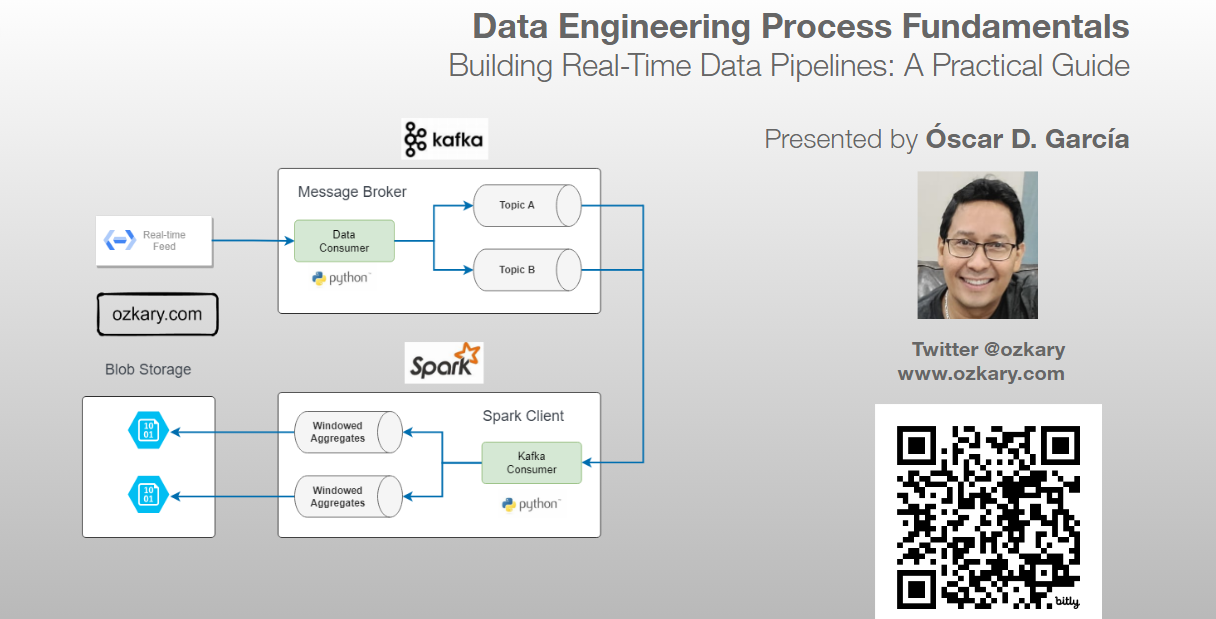
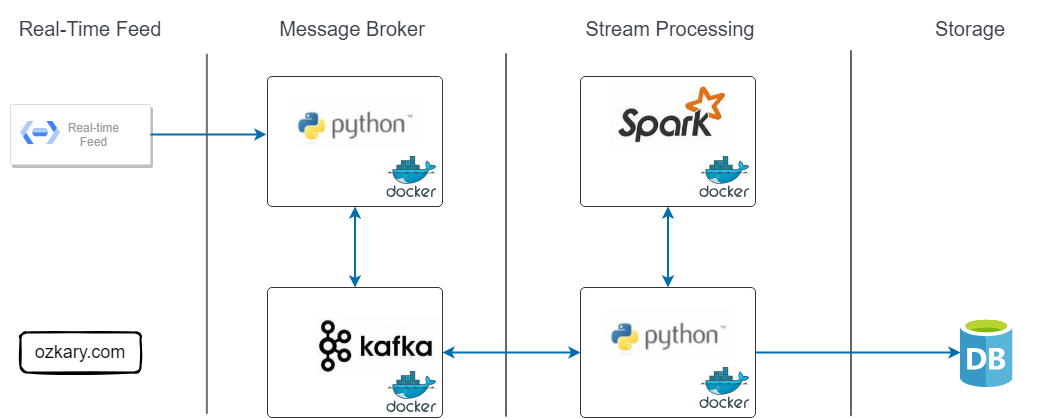
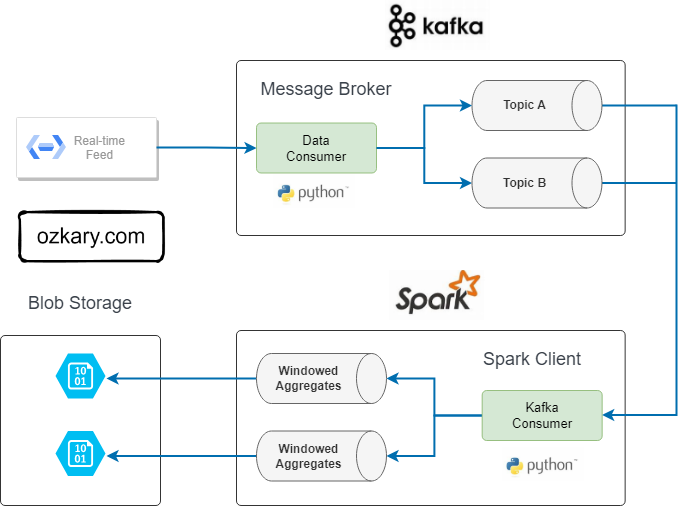
Data streams are captured by the Kafka producer and sent to Kafka topics. The Spark-based stream consumer retrieves and processes the data in real-time, aggregating it for storage in the data lake.

Components:

  • Real-Time Data Source: Continuously emits data streams (events or messages).
  • Message Broker Layer:
    • Kafka Broker Instance: Acts as a central hub, efficiently collecting and organizing data into topics.
    • Kafka Producer (Python): Bridges the gap between the source and Kafka.
  • Stream Processing Layer:
    • Spark Instance: Processes and transforms data in real-time using Apache Spark.
    • Stream Consumer (Python): Consumes messages from Kafka and acts as both a Kafka consumer and Spark application:
      • Retrieves data as soon as it arrives.
      • Processes and aggregates data.
      • Saves results to a data lake.
  • Data Storage: Data transformation for visualization tools (Looker, Power BI) to access.
  • Docker Containers: Use containers for deployments

Data Engineering Process Fundamentals - Data streaming MTA Gates

Data Transformation and Incremental Strategy

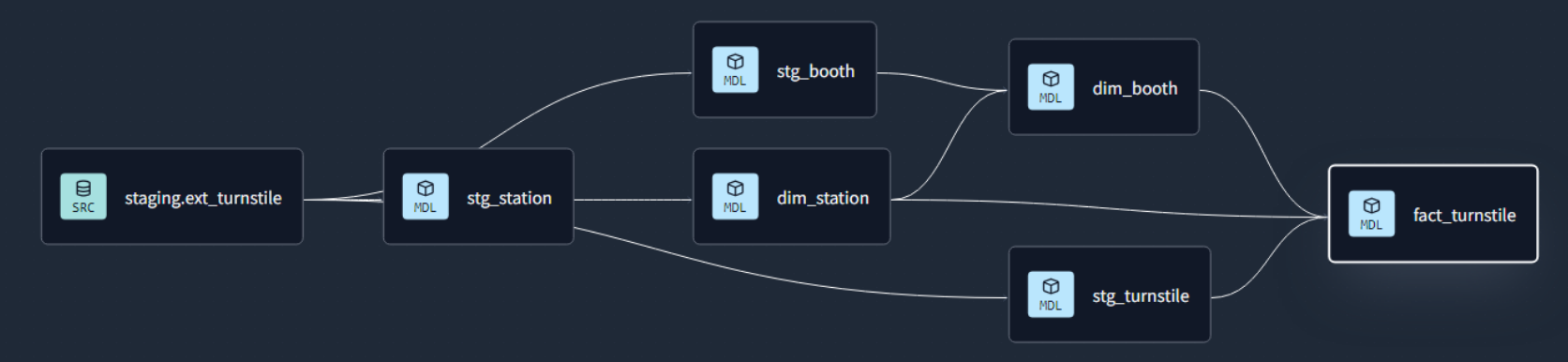
The data transformation phase is a critical stage in a data warehouse project. This phase involves several key steps, including data extraction, cleaning, loading, data type casting, use of naming conventions, and implementing incremental loads to continuously insert the new information since the last update via batch processes.

Data Engineering Process Fundamentals - Data transformation lineage

Data Lineage: Tracks the flow of data from its origin to its destination, including all the intermediate processes and transformations that it undergoes.

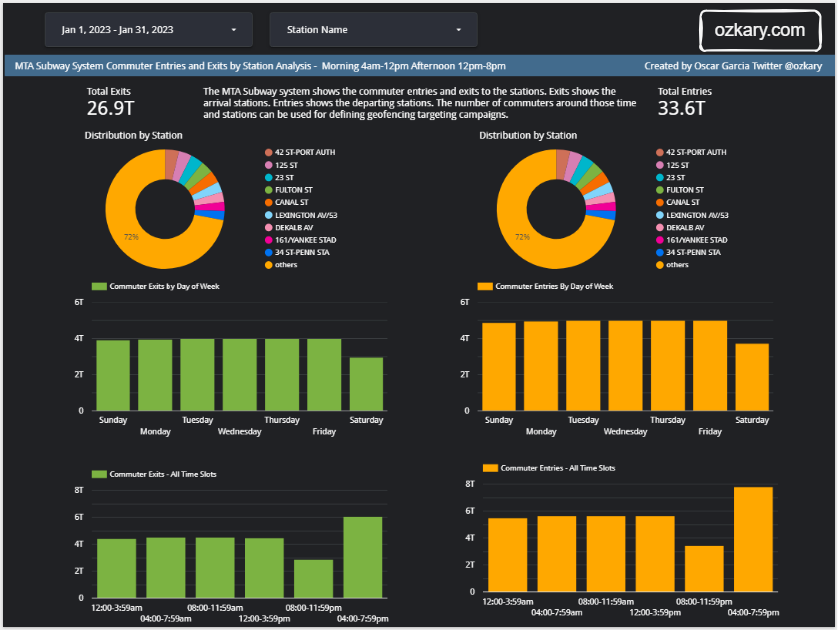
Impact on Data Visualization

  • Our architecture efficiently processes real-time data by leveraging our existing data transformation layer.
  • This optimized flow enables significantly faster data visualization.
  • The dashboard refresh time can increase their frequency to load the new data.

For real-time updates directly on the dashboard, a socket-based integration would be necessary.

Data Engineering Process Fundamentals - Data transformation lineage

Key Takeaways: Real-Time Integration

Data streaming solutions are an absolute necessity, enabling the rapid processing and analysis of vast amounts of real-time data. Technologies like Kafka and Spark play a pivotal role in empowering organizations to harness real-time insights from their data streams.

  • Real-time Power: Kafka handles various data streams, feeding them to data topics.
  • Spark Processing Power: Spark reads from these topics, analyzes messages in real-time, and aggregates the data to our specifications.
  • Existing Pipeline Integration: Leverages existing pipelines to write data to data lakes for transformation.
  • Faster Insights: Delivers near real-time information for quicker data analysis and visualization.

We've covered a lot today, but this is just the beginning!

If you're interested in learning more about building cloud data pipelines, I encourage you to check out my book, 'Data Engineering Process Fundamentals,' part of the Data Engineering Process Fundamentals series. It provides in-depth explanations, code samples, and practical exercises to help in your learning.

Data Engineering Process Fundamentals - Book by Oscar Garcia Data Engineering Process Fundamentals - Book by Oscar Garcia

Thanks for reading.

Send question or comment at Twitter @ozkary 👍 Originally published by ozkary.com

9/9/23

Data Engineering Process Fundamentals - Data Streaming Exersise

Data Streaming - Exercise

Now that we've covered the concepts of data streaming, let's move forward with an actual coding exercise. During this exercise, we'll delve into building a Kafka message broker and a Spark consumer with the objective of having the Kafka message broker work as a data producer for our subway system information. The Spark consumer acts as a message aggregator and writes the results to our data lake. This allows the data modeling process to pick up the information and insert it into the data warehouse, providing seamless integration and reusing our already operational data pipeline.

Batch Process vs Data Stream

In a batch process data pipeline, we define a schedule to process the data from its source. With a data stream pipeline, there is no schedule as the data flows as soon as it is available from its source.

In the batch data download, the data is aggregated for periods of four hours. Since the data stream comes in more frequently, there is no four-hour aggregation. The data comes in as single transactions.

Data Stream Strategy

From our system requirements, we already have a data pipeline process that runs an incremental update process to import the data from the data lake into our data warehouse. This process already handles data transformation, mapping, and populates all the dimension tables and fact tables with the correct information.

Therefore, we want to follow the same pipeline process and utilize what already exists. To account for the fact that the data comes in as a single transaction, and we do not want to create single files, we want to implement an aggregation strategy on our data streaming pipeline. This enables us to define time windows for when to publish the data, whether it's 1 minute or 4 hours. It really depends on what fits the business requirements. The important thing here is to understand the technical capabilities and the strategy for the solution.

Data Streaming Data Flow Process

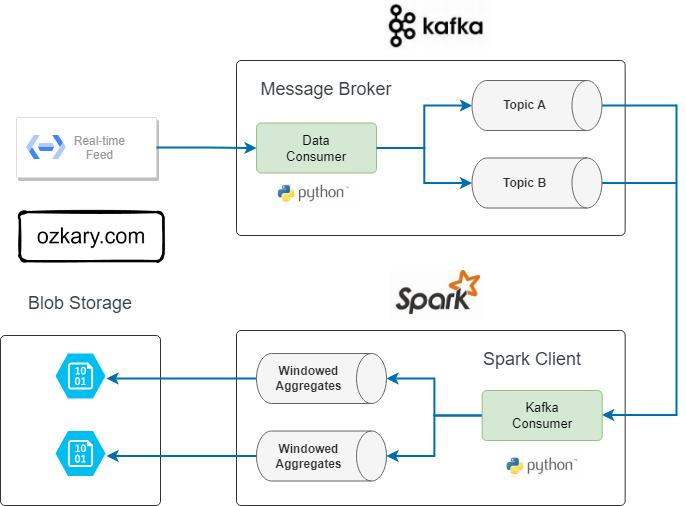
To deliver a data streaming solution, we typically employ a technical design illustrated as follows:

Data Engineering Process Fundamentals - Data Streaming Kafka Topics

  • Kafka

    • Producer
    • Topics
    • Consumer
  • Spark

    • Kafka Consumer
    • Message Parsing and Aggregations
    • Write to Data Lake or Other Storage

Kafka:

  • Producer: The producer is responsible for publishing data to Kafka topics. It produces and sends messages to specific topics, allowing data to be ingested into the Kafka cluster.
  • Topics: Topics are logical channels or categories to which messages are published by producers and from which messages are consumed by consumers. They act as data channels, providing a way to organize and categorize messages.
  • Consumer: Consumers subscribe to Kafka topics and process the messages produced by the producers. They play a vital role in real-time data consumption and are responsible for extracting valuable insights from the streaming data.

Spark:

  • Kafka Consumer: This component serves as a bridge between Kafka and Spark, allowing Spark to consume data directly from Kafka topics. It establishes a connection to Kafka, subscribes to specified topics, and pulls streaming data into Spark for further processing.

  • Message Parsing and Aggregations: Once data is consumed from Kafka, Spark performs message parsing to extract relevant information. Aggregations involve summarizing or transforming the data, making it suitable for analytics or downstream processing. This step is crucial for deriving meaningful insights from the streaming data.

  • Write to Data Lake or Other Storage: After processing and aggregating the data, Spark writes the results to a data lake or other storage systems. A data lake is a centralized repository that allows for the storage of raw and processed data in its native format. This step ensures that the valuable insights derived from the streaming data are persisted for further integration to a data warehouse.

Implementation Requirements

👉 Clone this repo or copy the files from this folder Streaming

For our example, we will adopt a code-centric approach and utilize Python to implement both our producer and consumer components. Additionally, we'll require instances of Apache Kafka and Apache Spark to be running. To ensure scalability, we'll deploy these components on separate virtual machines (VMs). Our Terraform scripts will be instrumental in creating new VM instances for this purpose. It's important to note that all these components will be encapsulated within Docker containers.

👉 For the ease of development in this lab, we can run everything on a single VM or local workstations. This allows us to bypass the complexities associated with network configuration. For real deployments, we should use separate VMs.

Requirements

👉 Before proceeding with the setup, ensure that the storage and Prefect credentials have been configured as shown on the Orchestration exercise step.

Docker

For running this locally or on virtual machines (VMs), the optimal approach is to leverage Docker Containers. In this exercise, we'll utilize a lightweight configuration of Kafka and Spark using Bitnami images. This configuration assumes a minimal setup with a Spark Master, a Spark Worker, and a Kafka broker.

Docker provides a platform for packaging, distributing, and running applications within containers. This ensures consistency across different environments and simplifies the deployment process. To get started, you can download and install Docker from the official website (https://www.docker.com/get-started). Once Docker is installed, the Docker command-line interface (docker) becomes available, enabling us to efficiently manage and interact with containers.

Docker Compose file

Utilize the docker-bitnami.compose.yaml file to configure a unified environment where both of these services should run. In the event that we need to run these services on distinct virtual machines (VMs), we would deploy each Docker image on a separate VM.

version: "3.6"
services:
  spark-master:
    image: bitnami/spark:latest
    container_name: spark-master
    environment:
      SPARK_MODE: "master"
    ports:
      - 8080:8080

  spark-worker:
    image: bitnami/spark:latest
    container_name: spark-worker
    environment:
      SPARK_MODE: "worker"
      SPARK_MASTER_URL: "spark://spark-master:7077"
    ports:
      - 8081:8081
    depends_on:
      - spark-master

  kafka:
    image: bitnami/kafka:latest
    container_name: kafka
    ports:
      - "9092:9092"
      - "29092:29092"  # Used for internal communication
    environment:
      KAFKA_LISTENER_SECURITY_PROTOCOL_MAP: PLAINTEXT:PLAINTEXT,PLAINTEXT_HOST:PLAINTEXT
      KAFKA_ADVERTISED_LISTENERS: PLAINTEXT://kafka:9092,PLAINTEXT_HOST://localhost:9092
      KAFKA_LISTENER_SECURITY_PROTOCOL_MAP: LISTENER_BOB:PLAINTEXT,LISTENER_FRED:PLAINTEXT
      KAFKA_LISTENERS: LISTENER_BOB://kafka:29092,LISTENER_FRED://kafka:9092
      KAFKA_ADVERTISED_LISTENERS: LISTENER_BOB://kafka:29092,LISTENER_FRED://localhost:9092
      KAFKA_INTER_BROKER_LISTENER_NAME: LISTENER_BOB
      KAFKA_OFFSETS_TOPIC_REPLICATION_FACTOR: 1
      KAFKA_GROUP_INITIAL_REBALANCE_DELAY_MS: 0
      KAFKA_TRANSACTION_STATE_LOG_MIN_ISR: 1
      KAFKA_TRANSACTION_STATE_LOG_REPLICATION_FACTOR: 1
    depends_on:
      - spark-master

Download the Docker Images

Before we proceed to run the Docker images, it's essential to download them in the target environment. To download the Bitnami images, you can execute the following script from a Bash command line:

$ bash download_images.sh
  • download_images.sh script

echo "Downloading Spark and Kafka Docker images..."

# Spark images from Bitnami
docker pull bitnami/spark:latest

# Kafka image from Bitnami
docker pull bitnami/kafka:latest

echo "Images downloaded successfully!"

# Display image sizes
echo "Image sizes:"
docker images bitnami/spark:latest bitnami/kafka:latest --format "{{.Repository}}:{{.Tag}} - {{.Size}}"

The download_images.sh script essentially retrieves two images from DockerHub. This script provides an automated way to download these images when creating new environments.

Start the Services

Once the Docker images are downloaded, initiate the services by executing the following script:

bash start_services.sh
  • start_services.sh script
#!/bin/bash

# Navigate to the Docker folder
cd docker

# Start Spark Master and Spark Worker
docker-compose up -f docker-compose-bitnami.yml -d spark-master spark-worker

# Wait for Spark Master and Worker to be ready (adjust sleep time as needed)
sleep 15

# Start Kafka and create Kafka topic
docker-compose up -d kafka

# Wait for Kafka to be ready (adjust sleep time as needed)
sleep 15

# Check if the Kafka topic exists before creating it
topic_exists=$(docker-compose exec kafka /opt/bitnami/kafka/bin/kafka-topics.sh --list --topic ozkary-topic --bootstrap-server localhost:9092 | grep "mta-turnstile")

if [ -z "$topic_exists" ]; then
  # Create Kafka topic
  docker-compose exec kafka /opt/bitnami/kafka/bin/kafka-topics.sh --create --topic mta-turnstile --partitions 1 --replication-factor 1 --bootstrap-server localhost:9092
  echo "Kafka topic created!"
else
  echo "Kafka topic already exists, no need to recreate."
fi

echo "Services started successfully!"

The start_services.sh script performs the following tasks:

  • Initiates Spark Master and Spark Worker services in detached mode (-d).
  • Launches Kafka service in detached mode.
  • Utilizes docker-compose exec to execute the Kafka topic creation command inside the Kafka container.

At this juncture, both services should be operational and ready to respond to client requests. Now, let's delve into implementing our applications.

Data Specifications

In this data streaming scenario, we are working with messages using a CSV data format with the following fields:

# Define the schema for the incoming data
turnstiles_schema = StructType([
    StructField("AC", StringType()),
    StructField("UNIT", StringType()),
    StructField("SCP", StringType()),
    StructField("STATION", StringType()),
    StructField("LINENAME", StringType()),
    StructField("DIVISION", StringType()),
    StructField("DATE", StringType()),
    StructField("TIME", StringType()),
    StructField("DESC", StringType()),
    StructField("ENTRIES", IntegerType()),
    StructField("EXITS", IntegerType()),
    StructField("ID", StringType()),
    StructField("TIMESTAMP", StringType())
])

The data format closely resembles what the source system provides for batch integration. However, in this scenario, we also have a unique ID and a TIMESTAMP.

As we process these messages, our objective is to generate files with data aggregation based on these fields:

"AC", "UNIT","SCP","STATION","LINENAME","DIVISION", "DATE", "DESC"

And these measures:

"ENTRIES", "EXITS"

An example of a message would look like this:

"A001,R001,02-00-00,Test-Station,456NQR,BMT,09-23-23,REGULAR,16:54:00,140,153"

It's important to note that the number of commuters is substantial, indicating a certain level of aggregation in these messages. However, they aren't aggregated every four hours, as the batch process does.

Once these message files are aggregated, they are then pushed to the data lake. Subsequently, our data warehouse process can pick them up and proceed with the necessary information processing.

Review the Code

To enable this functionality, we need to develop a Kafka producer and a Spark Kafka consumer, both implemented in Python. Let's begin by examining the fundamental features of the producer:

👉 Clone this repository or copy the files from this folder Streaming

Kafka Producer

The Kafka producer is a Python application designed to generate messages every 10 seconds. The produce_messages function utilizes messages from the provider and sends the serialized data to a Kafka topic.


class KafkaProducer:
    def __init__(self, config_path, topic):
        settings = read_config(config_path)
        self.producer = Producer(settings)
        self.topic = topic
        self.provider = Provider(topic)

    def delivery_report(self, err, msg):
        """
        Reports the success or failure of a message delivery.
        Args:
            err (KafkaError): The error that occurred on None on success.
            msg (Message): The message that was produced or failed.
        """
        if err is not None:
            print(f'Message delivery failed: {err}')
        else:
            print('Record {} produced to {} [{}] at offset {}'.format(msg.key(), msg.topic(), msg.partition(), msg.offset()))


    def produce_messages(self):
        while True:
            # Get the message key and value from the provider
            key, message = self.provider.message()

            try:

                # Produce the message to the Kafka topic
                self.producer.produce(topic = self.topic, key=key_serializer(key),
                                    value=value_serializer(message),
                                    on_delivery = self.delivery_report)

                # Flush to ensure delivery
                self.producer.flush()

                # Print the message
                print(f'Sent message: {message}')

                # Wait for 10 seconds before sending the next message
                time.sleep(10)
            except KeyboardInterrupt:
                pass
                exit(0)
            except KafkaTimeoutError as e:
                print(f"Kafka Timeout {e.__str__()}")
            except Exception as e:
                print(f"Exception while producing record - {key} {message}: {e}")
                continue

This class utilizes the Confluent Kafka library for seamless interaction with Kafka. It encapsulates the logic for producing messages to a Kafka topic, relying on external configurations, message providers, and serialization functions. The produce_messages method is crafted to run continuously until interrupted, while the delivery_report method serves as a callback function, reporting the success or failure of message delivery.

@flow (name="MTA Data Stream flow", description="Data Streaming Flow")
def main_flow(params) -> None:
    """
    Main flow to read and send the messages
    """    
    topic = params.topic    
    config_path = params.config    
    producer = KafkaProducer(config_path, topic)

    producer.produce_messages()

if __name__ == "__main__":

    """main entry point with argument parser"""
    os.system('clear')
    print('publisher running...')
    parser = argparse.ArgumentParser(description='Producer : --topic mta-turnstile --config path-to-config')

    parser.add_argument('--topic', required=True, help='stream topic')    
    parser.add_argument('--config', required=True, help='kafka setting') 

    args = parser.parse_args()

    # Register the signal handler to handle Ctrl-C       
    signal.signal(signal.SIGINT, lambda signal, frame: handle_sigint(signal, frame, producer.producer))

    main_flow(args)

    print('publisher end')

The main block acts as the entry point, featuring an argument parser that captures the topic and Kafka configuration path from the command line. The script then invokes the main_flow function with the provided arguments.

The main_flow function is annotated with @flow and functions as the primary entry point for the flow. This flow configuration enables us to monitor the flow using our Prefect Cloud monitoring system. It takes parameters (topic and config_path) and initializes a Kafka producer using the provided configuration path and topic.

👉 The data generated by this producer uses dummy data. It's important to note that the MTA system lacks a real-time feed for the turnstile data.

Spark - Kafka Consumer

The Spark PySpark application listens to a Kafka topic to retrieve messages. It parses these messages using a predefined schema to define the fields and their types. Since these messages arrive every ten seconds, our goal is to aggregate them within a time-span duration of five minutes. The specific duration can be defined based on solution requirements, and for our purposes, it aligns seamlessly with our current data pipeline flow. The aggregated messages are then serialized into compressed CSV files and loaded into the data lake. Subsequently, the data warehouse incremental process can merge this information into our data warehouse.

Our Spark application comprises the following components:

  • Spark Setting class
  • Spark Consumer class
  • Main Application Entry
    • Prefect libraries for flow monitoring
    • Prefect component for accessing the data lake
    • Access to the data lake

Spark Setting Class


class SparkSettings:
    def __init__(self, config_path: str, topic: str, group_id: str, client_id: str) -> None:
        self.settings = read_config(config_path)

        use_sasl = "sasl.mechanism" in self.settings and self.settings["sasl.mechanism"] is not None

        self.kafka_options = {
            "kafka.bootstrap.servers": self.settings["bootstrap.servers"],
            "subscribe": topic,
            "startingOffsets": "earliest",
            "failOnDataLoss": "false",
            "client.id": client_id,
            "group.id": group_id,            
            "auto.offset.reset": "earliest",
            "checkpointLocation": "checkpoint",
            "minPartitions": "2",
            "enable.auto.commit": "false",
            "enable.partition.eof": "true"                        
        }          

        if use_sasl:
            # set the JAAS configuration only when use_sasl is True
            sasl_config = f'org.apache.kafka.common.security.plain.PlainLoginModule required serviceName="kafka" username="{self.settings["sasl.username"]}" password="{self.settings["sasl.password"]}";'

            login_options = {
                "kafka.sasl.mechanisms": self.settings["sasl.mechanism"],
                "kafka.security.protocol": self.settings["security.protocol"],
                "kafka.sasl.username": self.settings["sasl.username"],
                "kafka.sasl.password": self.settings["sasl.password"],  
                "kafka.sasl.jaas.config": sasl_config          
            }
            # merge the login options with the kafka options
            self.kafka_options = {**self.kafka_options, **login_options}


    def __getitem__(self, key):
        """
            Get the value of a key from the settings dictionary.
        """
        return self.settings[key]

    def set_jass_config(self) -> None:
        """
            Set the JAAS configuration with variables
        """
        jaas_config = (
            "KafkaClient {\n"
            "    org.apache.kafka.common.security.plain.PlainLoginModule required\n"
            f"    username=\"{self['sasl.username']}\"\n"
            f"    password=\"{self['sasl.password']}\";\n"            
            "};"
        )

        print('========ENV===========>',jaas_config)
        # Set the JAAS configuration in the environment
        os.environ['KAFKA_OPTS'] = f"java.security.auth.login.config={jaas_config}"        
        os.environ['java.security.auth.login.config'] = jaas_config

The Spark Setting class manages the configuration for connecting to a Kafka topic and receiving messages within Spark.

Spark Consumer Class

class SparkConsumer:
    def __init__(self, settings: SparkSettings, topic: str, group_id: str, client_id: str):
        self.settings = settings
        self.topic = topic        
        self.group_id = group_id
        self.client_id = client_id
        self.stream = None
        self.data_frame = None   
        self.kafka_options = self.settings.kafka_options     

    def read_kafka_stream(self, spark: SparkSession) -> None:
        """
        Reads the Kafka Topic.
        Args:
            spark (SparkSession): The spark session object.
        """
        self.stream = spark.readStream.format("kafka").options(**self.kafka_options).load()

    def parse_messages(self, schema) -> DataFrame:
        """
        Parse the messages and use the provided schema to type cast the fields
        """
        stream = self.stream

        assert stream.isStreaming is True, "DataFrame doesn't receive streaming data"

        options =  {'header': 'true', 'sep': ','}
        df = stream.selectExpr("CAST(key AS STRING)", "CAST(value AS STRING)", "timestamp")               

        # split attributes to nested array in one Column
        col = F.split(df['value'], ',')

        # expand col to multiple top-level columns
        for idx, field in enumerate(schema):
            df = df.withColumn(field.name, col.getItem(idx).cast(field.dataType))

        # remove quotes from TIMESTAMP column
        df = df.withColumn("TIMESTAMP", F.regexp_replace(F.col("TIMESTAMP"), '"', ''))    
        df = df.withColumn("CA", F.regexp_replace(F.col("CA"), '"', ''))    

        result = df.select([field.name for field in schema])    

        df.dropDuplicates(["ID","STATION","TIMESTAMP"])

        result.printSchema()

        return result

    def agg_messages(self, df: DataFrame,  window_duration: str, window_slide: str) -> DataFrame:
        """
            Window for n minutes aggregations group by by AC, UNIT, STATION, DATE, DESC
        """
       # Ensure TIMESTAMP is in the correct format (timestamp type)    
        date_format = "yyyy-MM-dd HH:mm:ss"        
        df = df.withColumn("TS", F.to_timestamp("TIMESTAMP", date_format))    

        df_windowed = df \
            .withWatermark("TS", window_duration) \
            .groupBy(F.window("TS", window_duration, window_slide),"CA", "UNIT","SCP","STATION","LINENAME","DIVISION", "DATE", "DESC") \
            .agg(
                F.sum("ENTRIES").alias("ENTRIES"),
                F.sum("EXITS").alias("EXITS")
            ).withColumn("START",F.col("window.start")) \
            .withColumn("END", F.col("window.end")) \
            .withColumn("TIME", F.date_format("window.end", "HH:mm:ss")) \
            .drop("window") \
            .select("CA","UNIT","SCP","STATION","LINENAME","DIVISION","DATE","DESC","TIME","START","END","ENTRIES","EXITS")

        df_windowed.printSchema()            

        return df_windowed

The Spark consumer class initiates the consumer by loading the Kafka settings, reading from the data stream, parsing the messages, and ultimately aggregating the information using various categorical fields from the data.

The agg_messages function is crafted to perform windowed aggregations on a DataFrame containing message data. It requires three parameters: df (the input DataFrame with message information), window_duration (specifying the duration of each aggregation window in minutes), and window_slide (indicating the sliding interval for the window). The function ensures the 'TIMESTAMP' column is in the correct timestamp format and applies windowed aggregations based on 'AC', 'UNIT', 'STATION', 'DATE', and 'DESC' columns. The resulting DataFrame includes aggregated entries and exits for each window and group, providing insights into activity patterns over specified time intervals. The function also prints the schema of the resulting DataFrame, making it convenient for users to understand the structure of the aggregated data.

👉 The agg_messages function verifies that the timestamp from the data is in the correct Spark timestamp format. An incorrect format will prevent Spark from aggregating the messages, resulting in empty data files.

Main application entry point

# @task(name="Stream write GCS", description='Write stream file to GCS', log_prints=False)
def stream_write_gcs(local_path: Path, file_name: str) -> None:

    """
        Upload local parquet file to GCS
        Args:
            path: File location
            prefix: the folder location on storage

    """    
    block_name = get_block_name()
    prefix = get_prefix()
    gcs_path = f'{prefix}/{file_name}'
    print(f'{block_name} {local_path} {gcs_path}')

    gcs_block = GcsBucket.load(block_name)        
    gcs_block.upload_from_path(from_path=local_path, to_path=gcs_path)

    return


# @task (name="MTA Spark Data Stream - Process Mini Batch", description="Write batch to the data lake")
def process_mini_batch(df, batch_id, path):
    """Processes a mini-batch, converts to Pandas, and writes to GCP Storage as CSV.gz."""

     # Check if DataFrame is empty
    if df.count() == 0:
        print(f"DataFrame for batch {batch_id} is empty. Skipping processing.")
        return

    # Convert to Pandas DataFrame
    df_pandas = df.toPandas()

    # Convert 'DATE' column to keep the same date format
    df_pandas['DATE'] = pd.to_datetime(df_pandas['DATE'], format='%m-%d-%y').dt.strftime('%m/%d/%Y')

    print(df_pandas.head())

    # Get the current timestamp
    timestamp = datetime.now()
    # Format the timestamp as needed
    time = timestamp.strftime("%Y%m%d_%H%M%S")    

    # Write to Storage as CSV.gz    
    file_name = f"batch_{batch_id}_{time}.csv.gz"
    file_path = f"{path}/{file_name}"
    df_pandas.to_csv(file_path, compression="gzip")

    # send to the data lake
    stream_write_gcs(file_path, file_name)

@task (name="MTA Spark Data Stream - Aggregate messages", description="Aggregate the data in time windows")
def aggregate_messages(consumer, df_messages, window_duration, window_slide) -> DataFrame:
    df_windowed = consumer.agg_messages(df_messages, window_duration, window_slide)
    return df_windowed

@task (name="MTA Spark Data Stream - Read data stream", description="Read the data stream")
def read_data_stream(consumer, spark_session) -> None:
    consumer.read_kafka_stream(spark_session) 

# write a streaming data frame to storage ./storage
@task (name="MTA Spark Data Stream - Write to Storage", description="Write batch to the data lake")
def write_to_storage(df: DataFrame, output_mode: str = 'append', processing_time: str = '60 seconds') -> None:
    """
        Output stream values to the console
    """   
    df_csv = df.select(
        "CA", "UNIT", "SCP", "STATION", "LINENAME", "DIVISION", "DATE", "TIME", "DESC","ENTRIES", "EXITS"
    )

    path = "./storage/"     

    folder_path = Path(path)
    if not os.path.exists(folder_path):
        folder_path.mkdir(parents=True, exist_ok=True)

    storage_query = df_csv.writeStream \
        .outputMode(output_mode) \
        .trigger(processingTime=processing_time) \
        .format("csv") \
        .option("header", True) \
        .option("path", path) \
        .option("checkpointLocation", "./checkpoint") \
        .foreachBatch(lambda batch, id: process_mini_batch(batch, id, path)) \
        .option("truncate", False) \
        .start()

    try:
        # Wait for the streaming query to terminate
        storage_query.awaitTermination()
    except KeyboardInterrupt:
        # Handle keyboard interrupt (e.g., Ctrl+C)
        storage_query.stop()

@flow (name="MTA Spark Data Stream flow", description="Data Streaming Flow")
def main_flow(params) -> None:
    """
    main flow to process stream messages with spark
    """    
    topic = params.topic
    group_id = params.group    
    client_id = params.client
    config_path = params.config    

    # define a window for n minutes aggregations group by station
    default_span = '5 minutes'
    window_duration = default_span if params.duration is None else f'{params.duration} minutes'
    window_slide = default_span if params.slide is None else f'{params.slide} minutes'

    # create the consumer settings
    spark_settings = SparkSettings(config_path, topic, group_id, client_id)    

    # create the spark consumer
    spark_session = SparkSession.builder \
            .appName("turnstiles-consumer") \
            .config("spark.sql.adaptive.enabled", "false") \
            .getOrCreate()                

    spark_session.sparkContext.setLogLevel("WARN")

    # create an instance of the consumer class
    consumer = SparkConsumer(spark_settings, topic, group_id, client_id)

    # set the data frame stream
    read_data_stream(consumer, spark_session)
    # consumer.read_kafka_stream(spark_session) 

    # parse the messages
    df_messages = consumer.parse_messages(schema=turnstiles_schema)    

    df_windowed = aggregate_messages(consumer, df_messages, window_duration, window_slide)
    # df_windowed = consumer.agg_messages(df_messages, window_duration, window_slide)

    write_to_storage(df=df_windowed, output_mode='append',processing_time=window_duration)

    spark_session.streams.awaitAnyTermination()


if __name__ == "__main__":
    """
        Main entry point for streaming data between kafka and spark        
    """
    os.system('clear')
    print('Spark streaming running...')
    parser = argparse.ArgumentParser(description='Producer : --topic mta-turnstile --group spark_group --client app1 --config path-to-config')

    parser.add_argument('--topic', required=True, help='kafka topics')    
    parser.add_argument('--group', required=True, help='consumer group')
    parser.add_argument('--client', required=True, help='client id group')
    parser.add_argument('--config', required=True, help='cloud settings')    
    parser.add_argument('--duration', required=False, help='window duration for aggregation 5 mins')        
    parser.add_argument('--slide', required=False, help='window slide 5 mins')        

    args = parser.parse_args()

    main_flow(args)

    print('end')

This is a summary of the main application to start the consumer application:

  • stream_write_gcs

    • Purpose: Uploads a local Parquet file to Google Cloud Storage (GCS).
    • Prefect Cloud Monitoring: Marked as a Prefect task (@task) for monitoring.
  • process_mini_batch

    • Purpose: Processes a mini-batch from a Spark DataFrame, converts it to a Pandas DataFrame, and writes it to GCP Storage as a compressed CSV file.
    • Prefect Cloud Monitoring: Marked as a Prefect task (@task) for monitoring.
  • aggregate_messages

    • Purpose: Aggregates data in time windows based on specific columns.
    • Prefect Cloud Monitoring: Marked as a Prefect task (@task) for monitoring.
  • read_data_stream

    • Purpose: Reads the data stream from Kafka.
    • Prefect Cloud Monitoring: Marked as a Prefect task (@task) for monitoring.
  • write_to_storage

    • Purpose: Writes a streaming DataFrame to storage (./storage) and triggers the processing of mini-batches.
    • Prefect Cloud Monitoring: Marked as a Prefect task (@task) for monitoring.
  • main_flow

    • Purpose: Defines the main flow to process stream messages with Spark.
    • Prefect Cloud Monitoring: Marked as a Prefect flow (@flow) for orchestration and monitoring.
  • Main Entry Point:

    • Purpose: Parses command-line arguments and invokes the main_flow function to execute the streaming data processing.

👉 These decorators (@flow and @task) are employed for Prefect Cloud Monitoring, orchestration, and task management.

How to runt it!

With all the requirements completed and the code review done, we are ready to run our solution. Let's follow these steps to ensure our apps run properly.

Start the Container Services

Initiate the container services from the command line by executing the following script:

$ bash start_services.sh

Install dependencies and run the apps

👉 These applications depend on the Kafka and Spark services to be running. Ensure to start those services first.

Kafka Producer

Execute the producer with the following command line:

$ bash start_producer.sh

Spark - Kafka Consumer

Execute the Spark consumer from the command line:

$ bash start_consumer.sh

Execution Results

After the producer and consumer are running, the following results should be observed:

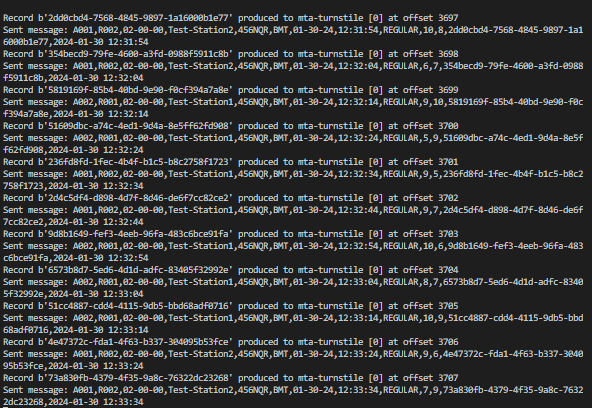
Kafka Producer Log

Data Engineering Process Fundamentals - Data Streaming Kafka Producer Log

As messages are sent by the producer, we should observe the activity in the console or log file.

Spark Consumer Log

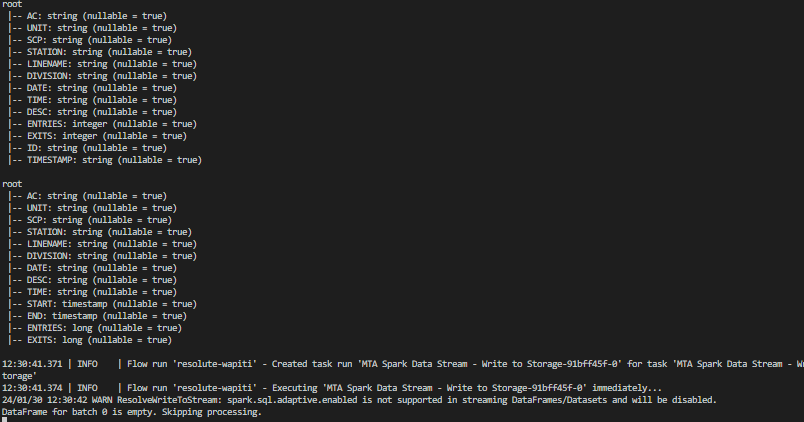
Data Engineering Process Fundamentals - Data Streaming Spark Consumer Log

Spark parses the messages in real-time, displaying the message schemas for both the individual message from Kafka and the aggregated message. Once the time window is complete, it serializes the message from memory into a compressed CSV file.

Cloud Monitor

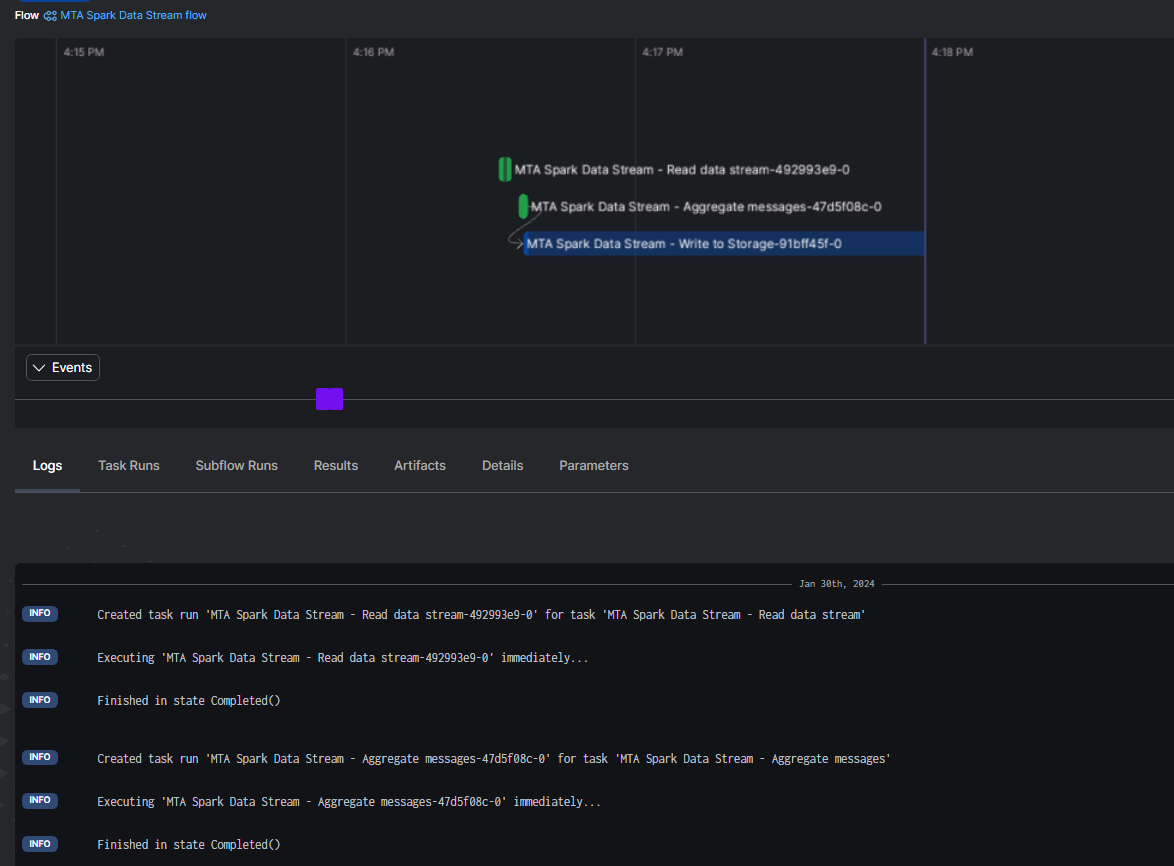
Data Engineering Process Fundamentals -  Data Streaming Cloud Monitor

As the application runs, the flows and tasks are tracked on our cloud console. This tracking is utilized to monitor for any failures.

Data Lake Integration

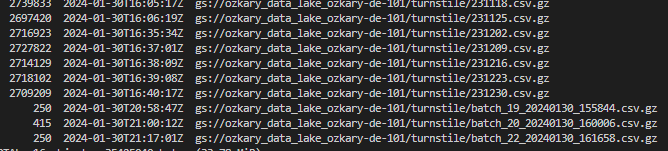
Data Engineering Process Fundamentals -  Data Streaming Data Lake

Upon serializing the data aggregation, a compressed CSV file is uploaded to the data lake with the purpose of making it visible to our data warehouse integration process.

Data Warehouse Integration

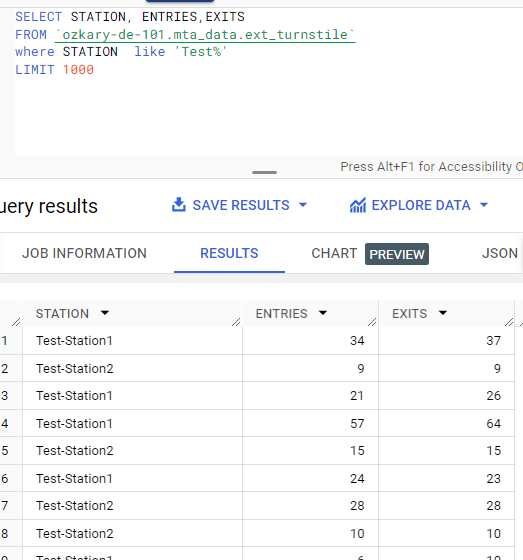
Data Engineering Process Fundamentals -  Data Streaming Data Warehouse

Once the data has been transferred to the data lake, we can initiate the integration from the data warehouse. A quick way to check is to query the external table using the test station name.

👉 Our weekly batch process is scheduled once per week. However, in a data stream use case, where the data arrives more frequently, we need to update the schedule to an hourly or minute window.

Deployment

For our deployment process, we can follow these steps:

  • Define the Docker files for each component
  • Build and push the apps to DockerHub
  • Deploy the Kafka and Spark services
  • Deploy the Kafka producer and Spark consumer apps

Define the Docker files for each component

To facilitate each deployment, we aim to run our applications within a Docker container. In each application folder, you'll find a Dockerfile. This file installs the application dependencies, copies the necessary files, and runs the specific command to load the application.

👉 Noteworthy is the use of the VOLUME command in these files, enabling us to map a VM hosting folder to an image folder. The objective is to share a common configuration file for the containers.

  • Kafka Producer Docker file
# Use a base image with Prefect and Python
FROM prefecthq/prefect:2.7.7-python3.9

# Set the working directory
WORKDIR /app

# Copy the requirements file to the working directory
COPY requirements.txt .

# Install dependencies
RUN pip install -r requirements.txt --trusted-host pypi.python.org --no-cache-dir

# Copy the entire current directory into the container
COPY *.py .

# Specify the default command to run when the container starts
CMD ["python3", "program.py", "--topic","mta-turnstile","--config","/config/docker-kafka.properties"]

# Create a directory for Kafka configuration
RUN mkdir -p /config

# Create a volume mount for Kafka configuration
VOLUME ["/config"]

# push the ~/.kafka/docker-kafka.properties to the target machine
# run as to map the volume to the target machine:
# docker run -v ~/.kafka:/config your-image-name
  • Spark Consumer Docker file
# Use a base image with Prefect and Python
FROM prefecthq/prefect:2.7.7-python3.9

# Set the working directory
WORKDIR /app

# Copy the requirements file to the working directory
COPY requirements.txt .

# Install dependencies
RUN pip install -r requirements.txt --trusted-host pypi.python.org --no-cache-dir

# Copy the entire current directory into the container
COPY *.py .
COPY *.sh .

# Create a directory for Kafka configuration
RUN mkdir -p /config

# Create a volume mount for Kafka configuration
VOLUME ["/config"]

# Set the entry point script as executable
RUN chmod +x submit-program.sh

# Specify the default command to run when the container starts
CMD ["/bin/bash", "submit-program.sh", "program.py", "/config/docker-kafka.properties"]

# push the ~/.kafka/docker-kafka.properties to the target machine
# run as to map the volume to the target machine:
# docker run -v ~/.kafka:/config your-image-name

Build and push the apps to DockerHub

To build the apps in Docker containers, execute the following script:

$ bash build_push_apps.sh

Deploy the Kafka and Spark services

For Kafka and Spark services, we are utilizing predefined Bitnami images from DockerHub. Deploy these images by running the following script on the target environment:

$ bash deploy_kafka_spark.sh

This script utilizes a Docker Compose file to pull the Bitnami images and subsequently run them.

👉 Docker Compose is a tool for defining and running multi-container Docker applications. It can define the services, networks, and volumes needed for the application in a single docker-compose.yml file.

Deploy the Kafka producer and Spark consumer apps

Once the app images are available from DockerHub, initiate the deployment against a new environment by executing this script:

$ bash deploy_publisher_consumer_apps.sh

This script pulls the app images from DockerHub and runs them independently.

👉 It's important to note that while we've covered a local and a GitHub Action deployment, deploying on a cloud provider environment involves additional considerations.

Deployment Strategy

In this guide, we've explored a two-fold approach to deploying our Kafka and Spark-based data streaming solution. Initially, we used the manual deployment process, demonstrating how to execute bash scripts for building and deploying our application. This hands-on method provides a detailed understanding of the steps involved, giving users complete control over the deployment process.

Moving forward, we showcased a more streamlined and automated approach by integrating GitHub Actions into our workflow. By leveraging GitHub Actions, we can trigger builds and deployments with a simple push to dedicated branches (deploy-bitnami and deploy-apps). This automation not only simplifies the deployment process but also enhances efficiency, ensuring consistency across environments.

Summary

The integration of Kafka and Spark in a data streaming architecture involves producers publishing data to Kafka topics, consumers subscribing to these topics, Spark consuming data from Kafka, parsing and aggregating messages, and finally, writing the processed data to a data lake or other storage for further processing.

Once the data is available in the data lake, the data warehouse process can pick up the new files and continue its incremental update process, ultimately reflecting on the analysis and visualization layer. This architecture enables real-time data processing and analytics in a scalable and fault-tolerant manner.

Thanks for reading.

Send question or comment at Twitter @ozkary

👍 Originally published by ozkary.com

8/5/23

Data Engineering Process Fundamentals - Data Streaming

In modern data engineering solutions, handling streaming data is very important. Businesses often need real-time insights to promptly monitor and respond to operational changes and performance trends. A data streaming pipeline facilitates the integration of real-time data into data warehouses and visualization dashboards. To achieve this integration in a data engineering solution, understanding the principles of data streaming is essential, and how technologies like Apache Kafka and Apache Spark play a key role in building efficient streaming data pipelines.

👉 Data Engineering Process Fundamentals - Data Analysis and Visualization

What is Data Streaming

Data streaming enables us to build data integration in real-time. Unlike traditional batch processing, where data is collected and processed periodically, streaming data arrives continuously by and is processed on-the-fly. This kind of integration empowers organizations to:

  • React Instantly: Timely responses to events and anomalies become possible
  • Predict Trends: Identify patterns and trends as they emerge
  • Enhance User Experience: Provide real-time updates and personalization
  • Optimize Operations: Streamline processes and resource allocation

ozkary-data-engineering-design-data-streaming-messages

Data Streaming Channels

Data streaming is a continuous data flow which can arrive from a channel that is usually hosted on an HTTP end-point. The type of the channel technology depends on the provider technology stack and can be any of the following:

  • Web Hooks: Web hooks are like virtual messengers that notify us when something interesting happens on the web. They are HTTP callbacks triggered by specific events, such as a change in a system. To harness data from web hooks, we set up endpoints that listen for these notifications, allowing us to react instantly to changes.

  • Events: Events are a fundamental concept in data streaming. They represent occurrences in a system or application, such as a user click, a sensor detecting a temperature change, or a train arrival to a station. Events can be collected and processed in real-time by using a middleware platform like Apache Kafka or RabbitMQ, providing insights into user behavior, system health, and more.

  • API Integration: APIs (Application Programming Interfaces) are bridges between different software systems. Through API integration, we can fetch data from external services, social media platforms, IoT devices, or any source that exposes an API. This seamless connectivity enables us to incorporate external data into our applications and processes by scheduling calls to the API at a certain frequency.

👍 Events are used for a wide range of real-time applications, including IoT data collection, application monitoring, and user behavior tracking. Web hooks are typically employed for integrating external services, automating workflows, and receiving notifications from third-party platforms.

Scaling to Handle a Data Stream

Data streaming sources often produce small payload size with high volume of messages. This introduces scalability concerns that should be addressed with essential components like the following:

  • Streaming Infrastructure: Robust streaming infrastructure is the backbone of data streaming. This includes systems like Apache Kafka, AWS Kinesis, or Azure Stream Analytics, which facilitate the ingestion, processing, and routing of data streams

  • Real-Time Processing: Traditional batch processing won't cut it for data streaming. We need real-time processing frameworks like Apache Storm, or Apache Spark Streaming to handle data as it flows

  • Data Storage: Storing and managing streaming data is crucial. we might use data lakes for long-term storage and databases optimized for real-time access. Cloud storage solutions offer scalability and reliability

  • Analytics and Visualization: To derive meaningful insights, we need analytics tools capable of processing streaming data. Visualization platforms like PowerBI, Looker, or custom dashboards can help you make sense of the information in real time

  • Monitoring and Alerts: Proactive monitoring ensures that your data streaming pipeline is healthy. Implement alerts and triggers to respond swiftly to anomalies or critical events

  • Scalable Compute Resources: As data volumes grow, compute resources should be able to scale horizontally to handle increased data loads. Cloud-based solutions are often used for this purpose

Data Streaming Components

At the heart of data streaming solutions lies technologies like Apache Kafka, a distributed event streaming platform, and Apache Spark, a versatile data processing engine. Together, they form a powerful solution that ingests, processes, and analyzes streaming data at scale.

ozkary-data-engineering-design-data-streaming

Apache Kafka

Kafka acts as the ingestion layer or message broker in the streaming pipeline. It serves as a highly durable, fault-tolerant, and scalable event streaming platform. Data producers, which can be various sources like applications, sensors, or webhooks publish events (messages) to Kafka topics. These events are typically small pieces of data containing information such as transactions, logs, or sensor readings. Let's look at a simplified overview of how Kafka works:

  • Kafka organizes events into topics. A topic is a logical channel or category to which records (messages) are sent by producers and from which records are consumed by consumers. Topics serve as the central mechanism for organizing and categorizing data within Kafka. Each topic can have multiple partitions to support fail-over scenarios

    • Kafka is distributed and provides fault tolerance. If a broker (Kafka server) fails, partitions can be replicated across multiple brokers
  • Kafka follows a publish-subscribe model. Producers send records to topics, and consumers subscribe to one or more topics to receive and process those records

    • A producer is a program or process responsible for publishing records to Kafka topics. Producers generate data, which is then sent to one or more topics. Each message in a topic is identified by an offset, which represents its position within the topic.

    • A consumer is a program or process that subscribes to one or more topics and processes the records within them. Consumers can read data from topics in real-time and perform various operations on it, such as analytics, storage, or forwarding to other systems

Apache Spark Structured Streaming

Apache Spark Structured Streaming is a micro-batch processing framework built on top of Apache Spark. It enables real-time data processing by ingesting data from Kafka topics in mini-batches. Here's how the process works:

👍 Apache Spark offers a unified platform for both batch and stream processing. If your application requires seamless transitions between batch and stream processing modes, Spark can be a good fit.

  • Kafka Integration: Spark Streaming integrates with Kafka using the Kafka Direct API. It can consume data directly from Kafka topics, leveraging Kafka's parallelism and fault tolerance features

  • Mini-Batch Processing: Spark Streaming reads data from Kafka topics in mini-batches, typically ranging from milliseconds to seconds. Each mini-batch of data is treated as a Resilient Distributed Dataset (RDD) within the Spark ecosystem

  • Data Transformation: Once the data is ingested into Spark Streaming, we can apply various transformations, computations, and analytics on the mini-batches of data. Spark provides a rich set of APIs for tasks like filtering, aggregating, joining, and machine learning

  • Windowed Operations: Spark Streaming allows us to perform windowed operations, such as sliding windows or tumbling windows, to analyze data within specific time intervals. This is useful for aggregating data over fixed time periods (e.g., hourly, daily) or for tracking patterns over sliding windows

  • Output: After processing, the results can be stored in various destinations, such as a data lake (e.g., Hadoop HDFS), a data warehouse (e.g., BigQuery, Redshift), or other external systems. Spark provides connectors to these storage solutions for seamless data persistence

Benefits of a Kafka and Spark Integration

A Kafka and Spark integration enables us to build solutions with High Availability requirements due to the following features:

  • Fault Tolerance: Kafka ensures that events are not lost even in the face of hardware failures, making it a reliable source of data

  • Scalability: Kafka scales horizontally, allowing you to handle increasing data volumes by adding more Kafka brokers

  • Flexibility: Spark Streaming's flexibility in data processing and windowing operations enables a wide range of real-time analytics

  • End-to-End Pipeline: By combining Kafka's ingestion capabilities with Spark's processing power, you can create end-to-end data streaming pipelines that handle real-time data ingestion, processing, and storage

Supported Programming Languages

When it comes to programming language support, both Kafka and Spark allows developers to choose the language that aligns best with their skills and project requirements.

  • Kafka supports multiple programming languages, including Python, C#, and Java

  • Spark also support multiple programming languages like PySpark (Python), Scala, and even R for data processing tasks. Additionally, Spark allows users to work with SQL-like expressions, making it easier to perform complex data transformations and analysis

Sample Python Code for a Kafka Producer

This is a very simple implementation of a Kafka producer using Python as the programming language. This code does not consume a data feed from a provider. It only shows how a producer sends messages to a Kafka topic.


from kafka import KafkaProducer
import time

kafka_broker = "localhost:9092"

# Create a Kafka producer instance
producer = KafkaProducer(
    bootstrap_servers=kafka_broker,  # Replace with your Kafka broker's address
    value_serializer=lambda v: str(v).encode('utf-8')
)

# Sample data message (comma-delimited)
sample_message = "timestamp,station,turnstile_id,device_id,entry,exit,entry_datetime"

try:
    # continue to run until the instance is shutdown
    while True:
        # Simulate generating a new data message. This data should come from the data provider
        data_message = sample_message + f"\n{int(time.time())},StationA,123,456,10,15,'2023-07-12 08:30:00'"

        # Send the message to the Kafka topic
        producer.send('turnstile-stream', value=data_message)

        # add logging information for tracking
        print("Message sent:", data_message)
        time.sleep(1)  # Sending messages every second
except KeyboardInterrupt:
    pass
finally:
    producer.close()

This Kafka producer code initializes a producer and sends a sample message to the specified Kafka topic. Let's review each code segment:

  • Create Kafka Producer Configuration:

    • Set up the Kafka producer configuration
    • Specify the Kafka broker(s) to connect to (bootstrap.servers)
  • Define Kafka Topic: Define the Kafka topic to send messages (turnstile-stream in this example)

  • Create a Kafka Producer:

    • Create an instance of the Kafka producer with the broker end-point
    • Use a value_serializer to encode the string message with unicode utf-8
  • Define Message Contents:

    • Prepare the message to send as a CSV string with the header and value information
  • Produce Messages:

    • Use the send method of the Kafka producer to send messages to the Kafka topic, turnstile-stream
  • Close the Kafka Producer:

    • Always remember to close the Kafka producer when the application terminates to avoid leaving open connections on the broker

Sample Python Code for a Kafka Consumer and Spark Client

After looking at the Kafka producer code, let's take a look at how a Kafka consumer on Spark would consume and process the messages.


from pyspark.sql import SparkSession
from pyspark.streaming import StreamingContext
from pyspark.streaming.kafka import KafkaUtils
from pyspark.sql.functions import window, sum

# Create a Spark session
spark = SparkSession.builder.appName("TurnstileStreamApp").getOrCreate()

# Create a StreamingContext with a batch interval of 5 seconds
ssc = StreamingContext(spark.sparkContext, 5)

kafka_broker = "localhost:9092"

# Define the Kafka broker and topic to consume from
kafkaParams = {
    "bootstrap.servers": kafka_broker,  # Replace with your Kafka broker's address
    "auto.offset.reset": "latest",
}
topics = ["turnstile-stream"]

# Create a Kafka stream
kafkaStream = KafkaUtils.createDirectStream(ssc, topics, kafkaParams)

# Parse the Kafka stream as a DataFrame
lines = kafkaStream.map(lambda x: x[1])
df = spark.read.csv(lines)

# Define a window for aggregation (4-hour window)
windowed_df = df
  .withWatermark("entry_datetime", "4 hours") \
  # 4-hour window with a 4-hour sliding interval
  .groupBy("station", window("entry_datetime", "4 hours")) 
  .agg(
    sum("entries").alias("entries"),
    sum("exits").alias("exits")
  )

# Write the aggregated data to a blob storage as compressed CSV files
query = windowed_df.writeStream\
    .outputMode("update")\
    .foreachBatch(lambda batch_df, batch_id: batch_df.write\
        .mode("overwrite")\
        .csv("gs://your-bucket-name/")  # Replace with your blob storage path
    )\
    .start()

query.awaitTermination()

This simple example shows how to write a Kafka consumer, use Spark to process and aggregate the data, and finally write a csv file to the data lake. Let’s look at each code segment for more details:

  • Create a Spark Session:

    • Initialize a Spark session with the name "TurnstileStreamApp"
  • Create a StreamingContext:

    • Set up a StreamingContext with a batch interval of 5 seconds. This determines how often Spark will process incoming data
  • Define Kafka Broker and Topic:

    • Specify the Kafka broker's address (localhost:9092 in this example) and the topic to consume data from ("turnstile-stream")
  • Create a Kafka Stream:

    • Use KafkaUtils to create a direct stream from Kafka
    • The stream will consume data from the specified Kafka topic
  • Parse the Kafka Stream:

    • Extract the message values from the Kafka stream
    • Read these messages into a DataFrame (df) using Spark's CSV reader
  • Define a Window for Aggregation:

    • We specify the watermark for late data using withWatermark. This ensures that any data arriving later than the specified window is still considered for aggregation
    • Create a windowed DataFrame (windowed_df) by grouping data based on "station" and a 4-hour window
    • The "entry_datetime" column is used as the timestamp for windowing
    • Aggregations are performed to calculate the sum of "entries" and "exits" within each window
  • Write the Aggregated Data to a Data Lake:

    • Define a streaming query (query) to write the aggregated data to a blob storage path
    • The "update" output mode indicates that only updated results will be written
    • A function is applied to each batch of data, which specifies how to write the data
    • In this case, data is written as compressed CSV files to a data lake location
    • The awaitTermination method ensures the query continues to run and process data until manually terminated.

This Spark example processes data from Kafka, aggregates it in 4-hour windows, and it writes the results to blob storage. The code is structured to efficiently handle real-time streaming data and organize the output into folders in the data lake based on station names and time windows. In each folder, Spark will generate filenames automatically based on the default naming convention. Typically, it uses a combination of a unique identifier and partition number to create filenames. The exact format of the file name might vary depending on the Spark version and configuration. This approach is used to send the information to a data lake, so the data transformation process can pick it up and send to a data warehouse.

Alternatively, the Spark client can send the aggregated results directly in the data warehouse. The Spark client can connect to the data warehouse, so it can directly insert the information without using a data lake as an staging step.

Solution Design and Architecture

For our solution strategy, we followed the design shown below. This design helps us ensure smooth flow, efficient processing and storage of data so that it is immediately available in our data warehouse consequently, the visualization tools. Let's break down each component and explain its purpose.

ozkary-data-engineering-design-data-streaming

Components

  • Real-Time Data Source: This is an external data source, which continuously emits data as events or messages

  • Message Broker Layer: Our message broker layer is the central hub for data ingestion and distribution. It consists of two vital components:

    • Kafka Broker Instance: Kafka acts as a scalable message broker and entry point for data ingestion. It efficiently collects and organizes data in topics from the source
    • Kafka Producer (Python): To bridge the gap between the data source and Kafka, we write a Python-based Kafka producer. This component is responsible for capturing data from the real-time source and forwarding it to the Kafka instance and corresponding topic
  • Stream Processing Layer: The stream processing layer is where the messages from Kafka are processed, aggregated and sent to the corresponding data storage. This layer also consists of two key components:

    • Spark Instance: Apache Spark, a high-performance stream processing framework, is responsible for processing and transforming data in real-time
    • Stream Consumer (Python): In order to consume the messages from a Kafka topic, we write a Python component that acts as both a Kafka Consumer and Spark application.
      • The Kafka consumer retrieves data from the Kafka topic, ensuring that the data is processed as soon as it arrives
      • The Spark application process the messages, aggregates the data and saves the results in the data warehouse. This dual role ensures efficient data processing and storage.
  • Data Warehouse: As the final destination for our processed data, the data warehouse provides a reliable and structured repository for storing the results of our real-time data processing, so visualization tools like Looker and PowerBI can display the data as soon as the dashboards are refreshed

👉 We should note that dashboards query the data from the database. For a near real-time data to be available, the dashboard data needs to be refreshed at certain intervals (e.g., minutes or hourly). To make available the real-time data to the dashboard, there needs to be a live connection (socket) between the dashboard and the streaming platform, which is done by another system component, like Redis Cache or custom service, that could push those events on a socket channel.

DevOps Support

  • Containerization: In order to continue to meet our DevOps requirements, enhance scalability and manageability, and follow best enterprise level practices, we use Docker containers for all of our components. Each component, our Kafka and Spark instance as well as our two Python-based components, runs in separate Docker container. This ensures modularity, easy deployment, and resource isolation

    • This approach also enable us to use a Kubernetes cluster , a container orchestration platform that can help us manage and deploy Docker containers at scale, to run our components. We could use Minikube for local development or use a cloud-managed Kubernetes service like Google Kubernetes Engine (GKE), Amazon Elastic Kubernetes Service (EKS), or Azure Kubernetes Service (AKS)
  • Virtual Machine (VM): Our components need to run on a VM, so we follow the same approach and create a VM instance using a Terraform script, similar to how it was done for our batch data pipeline during our planning and design phase

Advantages

Our data streaming design offers several advantages:

  • Real-time Processing: Data is processed as it arrives, enabling timely insights and rapid response to changing conditions
  • Scalability: The use of Kafka and Spark allows us to scale our architecture effortlessly to handle growing data volumes
  • Containerization: Docker containers simplify deployment and management, making our system highly portable and maintainable
  • Integration: The seamless integration of Kafka, Spark, and the Kafka consumer as a Spark client ensures data continuity and efficient processing

This data streaming strategy, powered by Kafka and Spark, empowers us to unlock real-time insights from our data streams, providing valuable information for rapid decision-making, analytics, and storage.

Summary

In today's data-driven landscape, data streaming solutions are an absolute necessity, enabling the rapid processing and analysis of vast amounts of real-time data. Technologies like Kafka and Spark play a pivotal role in empowering organizations to harness real-time insights from their data streams.

Kafka and Spark, work together seamlessly to enable real-time data processing and analytics. Kafka handles the reliable ingestion of events, while Spark Streaming provides the tools for processing, transforming, analyzing, and storing the data in a data lake or data warehouse in near real-time, allowing businesses to make decisions much at a much faster pace.

Exercise - Data Streaming with Apache Kafka

Now that we have defined the data streaming strategy, we can continue our journey and build a containerized Kafka producer that can consume real-time data sources. Let's take a look at that next.

👉 Data Engineering Process Fundamentals - Data Streaming With Apache Kafka and Spark Exercise

Thanks for reading.

Send question or comment at Twitter @ozkary

👍 Originally published by ozkary.com